⚠️ Note: This project is a reference implementation from 2019. AWS SSO now provides native CLI support with temporary credential provisioning built-in. For new projects, AWS’s native solution is recommended.
Quick Access
🚀 Install Chrome Extension
💻 View on GitHub
AWS SAML Keys is a Chrome extension and host application that generate temporary AWS access keys directly from your SAML authentication to the AWS console, eliminating the need to manage static credentials.
The Problem with Static AWS Credentials
Key management has become increasingly complex. Organizations moved from storing AWS keys scattered across machines to centralizing them in vaults and password managers. But this doesn’t address the fundamental security issues:
- Permanent Keys — Long-lived credentials with no automatic expiration
- Privilege Escalation — Keys often carry escalated privileges for convenience
- Compromise Risk — Static credentials stored on user machines are vulnerable if the machine is compromised
- Rotation Burden — Regular key rotation requires manual processes and coordination
- Audit Trail — Hard to track when credentials were last used or accessed
Even with bastion hosts or centralized vaults, the root problem remains: the private key still ends up on a user’s local machine at some point.
The Solution: Temporary Access Tokens
Temporary AWS credentials solve these problems:
- Auto-Expiring — Tokens automatically expire (typically within hours)
- Single-Use Risk — If compromised, the window of exposure is minimal
- No Rotation — New credentials are generated on each login
- Audit-Friendly — Clear record of who accessed what and when
- Standardized — Uses AWS STS (Security Token Service) under the hood
How AWS SAML Keys Works
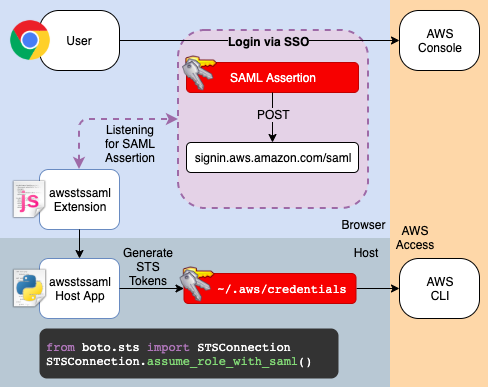
The extension bridges the gap between your SAML-based SSO authentication and the AWS CLI:
- Intercepts SSO Login — Chrome extension monitors your SAML login to the AWS console
- Captures SAML Assertion — Extracts the SAML assertion from your authenticated session
- Exchanges for Credentials — Uses AWS STS
AssumeRoleWithSAMLto convert the SAML assertion into temporary AWS credentials - Delivers to CLI — Native host application stores credentials in standard AWS CLI config (
~/.aws/credentials)
The credentials automatically appear in your AWS CLI configuration without any manual steps.
Setup
The extension requires two components:
- Chrome Extension — Install from the Chrome Web Store
- Host Application — Install the native messaging host from GitHub releases
The host application enables the extension to write credentials to your local AWS configuration.
Technical Details
The extension uses native messaging to communicate between the Chrome extension and a local host application:
- Extension (Chrome) — Captures SAML assertion after login, sends to host app
- Host App — Receives SAML assertion, calls AWS STS, writes credentials to disk
- AWS CLI — Automatically picks up credentials from standard config location
This two-part architecture avoids storing sensitive credentials in the browser while integrating seamlessly with the AWS CLI.
Originally posted on Medium.com.